LUSTRE FILE SYSTEM
What is Lustre?
Lustre is a high-performance, distributed (parallel) file system mainly used in:
- HPC clusters (scientific simulations, CFD, weather, AI/ML)
- Supercomputers
- Large research data centers
- GPU clusters and big data workloads
- Compute nodes do the calculations
- Lustre stores and serves data to all nodes at very high speed
- Many nodes can read/write the same file at the same time
NOTE: Lustre separates file information (metadata) from file data to achieve very high performance.
Lustre Architecture Diagram
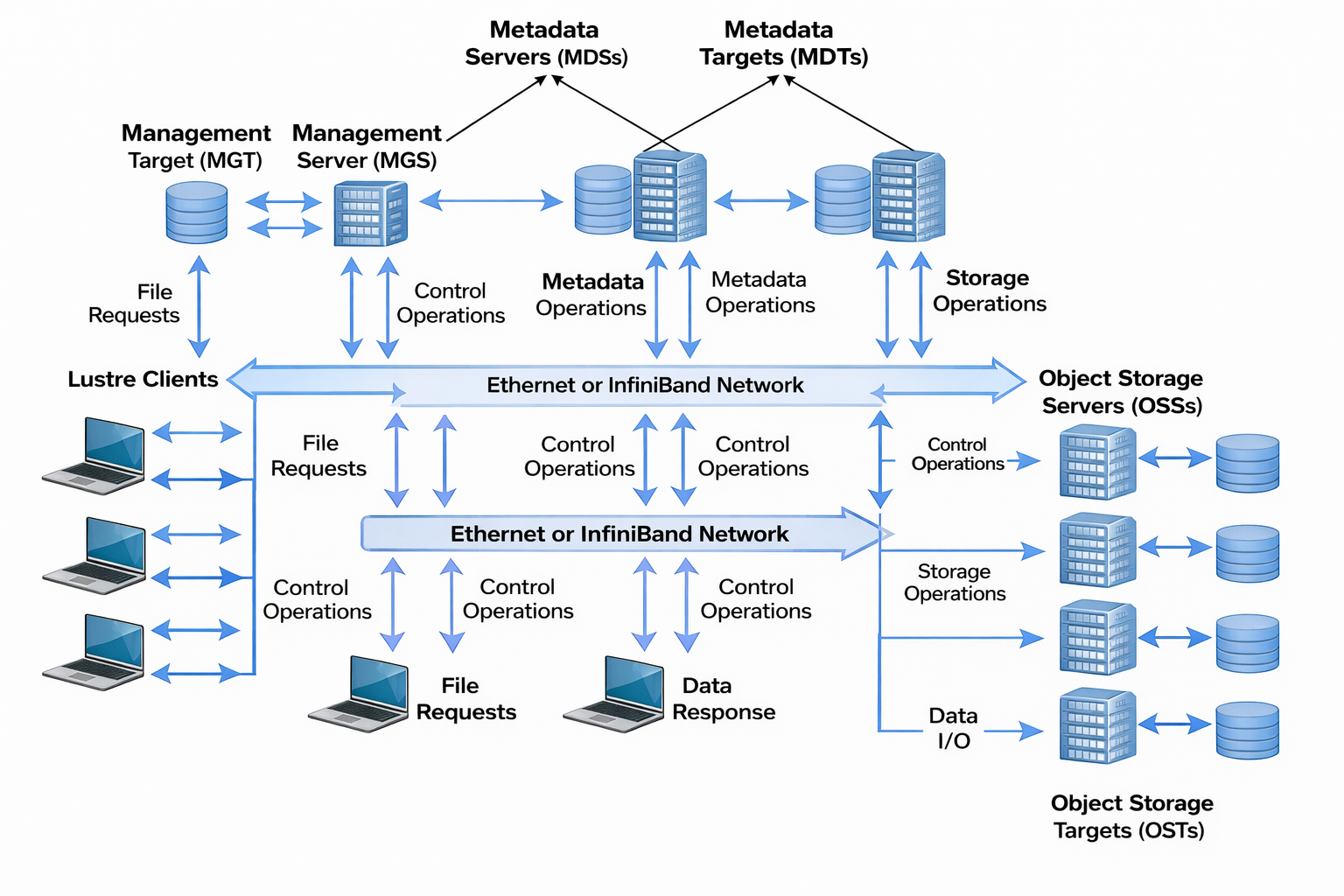 

Main Components and Their Roles
| Term | Meaning |
|---|---|
| MDS | Metadata Server (file info only) |
| MDT | Metadata Target (disk for metadata) |
| OSS | Object Storage Server |
| OST | Object Storage Target (data disks) |
| Client | Compute node using Lustre |
| Striping | Splitting a file across many OSTs |
| Object | A chunk of a file |
| LNET | Network layer used by Lustre |
| Parallel I/O | Many nodes read/write simultaneously |
🧠 Metadata Server (MDS)
- Stores file information only
- File name, permissions, owner, size, directory structure
- Does NOT store file data
💾 Object Storage Servers (OSS)
- Store the actual file data
- Each file is split into chunks (objects)
- These chunks are stored across multiple OSS nodes
📦 Object Storage Targets (OST)
- Disks or disk groups attached to OSS
- Actual location of data blocks
💻 Clients (Compute Nodes)
- Nodes that read/write data
- Ask MDS for metadata
- Read/write data directly to OSS
MDS (Metadata Server)
MDS (Metadata Server) is like the librarian of the Lustre file system.
- It does NOT store the file data
- It only stores information ABOUT files
That information is called metadata.
What is metadata?
Metadata means:
- File name
- Folder (directory) name
- Who owns the file
- Who is allowed to read/write
- Where the file’s data is stored
This metadata is saved on a disk called MDT (Metadata Target).
Metadata Operation Flow (Client → MDS → MDT)
1. Client → MDS
The client sends a metadata request to the Metadata Server (MDS), such as:
- Create file
- Open file
- Stat / lookup
- Permission check
2. MDS → MDT
The MDS forwards the request to the Metadata Target (MDT), asking:
“Do you have the metadata for this file?”
3. MDT (Metadata Storage)
The MDT is where metadata is actually stored. It contains:
- File name
- Directory hierarchy information
- Permissions (mode bits / ACLs)
- Owner and group
- Timestamps (atime, mtime, ctime)
- File layout information (e.g., OST striping info)
4. MDT → MDS (Response)
The MDT responds to the MDS with one of the following:
- For read / lookup operations:
- Returns the requested metadata
- For create / delete / update operations:
- Confirms that the metadata was successfully modified
5. MDS (Processing)
After receiving the response, the MDS:
- Verifies permissions
- Applies or manages metadata locks
- Coordinates consistency
- Prepares the final response
6. MDS → Client
The MDS sends the result back to the client (success, failure, or metadata info).
What is OSS?
OSS = Object Storage Server
- OSS is a server (machine)
- Its job is to serve file data to clients
Think of OSS as:
A data server that handles read/write requests
An OSS can manage multiple OSTs.
What is OST?
OST = Object Storage Target
- OST is the actual storage (disk or filesystem)
- This is where the file data is stored
Think of OST as:
A hard disk (or storage unit) that holds file blocks
Relationship
OSS (server)
├── OST1 (disk/storage)
├── OST2 (disk/storage)
└── OST3 (disk/storage)
- OSS = controls access
- OST = stores data
How OSS and OST Work Together
1. Client wants to read/write a file
Example:
cp file1 /lustre
2. Client asks MDS (not OSS yet)
- “Where is this file stored?”
MDS replies:
- “Your file is on OST1 and OST2”
3. Client talks directly to OSS
- Client sends data request to the OSS
- OSS knows:
- Which OST has which part of the file
4. OSS accesses the OST
- OSS reads/writes data on the OST disks
5. Data flows back to client
Client ⇄ OSS ⇄ OST
(OSS is the middle manager for the disks)
Why Separate OSS and OST?
Performance
- Many OSS servers
- Many OST disks
- Many clients working at the same time
This allows:
- Parallel data access
- High speed I/O
One-Line Definitions
- OSS: Server that handles file data requests
- OST: Storage where actual file data lives
Client and Data Flow Summary
In Lustre, the client contacts the MDS only for metadata and then communicates directly with OSS/OST for actual data I/O.
“Client talks directly to OSS/OST” — what it really means
The client gets file info from MDS, but gets file data from OSS/OST.
Real-life analogy 🏬
- MDS = Reception desk
- OSS/OST = Warehouse
-
Client = Customer
-
You ask the reception desk (MDS):
“Where is my package stored?” - Reception says:
“Your package is in Warehouse A, Shelf 3” - You go directly to the warehouse (OSS/OST)
- You take the package yourself
👉 Reception never touches the package
In Lustre terms
Step-by-step (very basic)
1. Client opens a file
vi data.txt
- Client asks MDS:
- Does file exist?
- Do I have permission?
- Where is the data stored?
2. MDS replies with layout
MDS says:
“The data is on OST1 and OST2”
3. Client talks directly to OSS/OST
- Client sends read/write requests straight to OSS
- Data flows:
Client ⇄ OSS/OST
❌ MDS is not involved in data transfer