Configuring Chrony NTP Sync for xCAT Compute Nodes
Lab environment:
labtesting(xCAT Management Node) — Rocky Linux 8.10
1. Overview
This document describes the procedure used to configure chrony (NTP) time synchronization on xCAT-managed compute nodes.
The compute node is configured to synchronize its system clock against the xCAT Management Node (MN) rather than an external time source.
The configuration is delivered through a custom xCAT postscript, assigned to the target node, and pushed using updatenode.
2. Environment Details
| Item | Value |
|---|---|
| Management Node | labtesting (192.168.245.128) |
| Compute Node | cnode01 |
| Operating System | Rocky Linux 8.10 |
| Provisioning Tool | xCAT |
| Time Service | chronyd |
| Timezone | Asia/Kolkata (IST, +0530) |
3. Procedure
3.1 Verify chronyd State on the Management Node
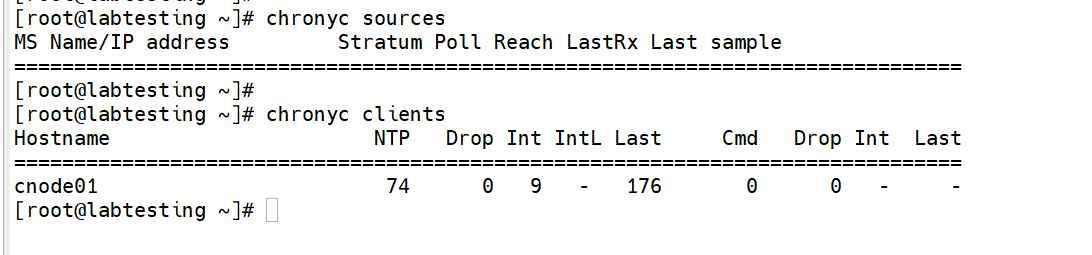
Before making changes, confirm that chronyd is running on the management node and check its current time sources and connected clients.
chronyc sources
chronyc clients
3.2 Create the xCAT Postscript
Create a custom postscript named setup_chrony_client under:
/install/postscripts/
The postscript:
- Resolves the management node IP using the xCAT
$MASTERvariable. - Creates
/etc/chrony.conf. - Configures the management node as the NTP server.
- Enables and restarts
chronyd. - Displays a confirmation message.
Create the postscript:
vi /install/postscripts/setup_chrony_client
Add the following content:
#!/bin/bash

# Configures this node's chronyd to sync against the xCAT
# management node

MASTER_IP=$(getent hosts $MASTER | awk '{print $1}')

cat > /etc/chrony.conf << CHRONY
server ${MASTER_IP} iburst
driftfile /var/lib/chrony/drift
makestep 1.0 3
rtcsync
logdir /var/log/chrony
CHRONY

systemctl enable --now chronyd
systemctl restart chronyd

echo "chrony client configured against master ${MASTER_IP}"
Make the postscript executable:
chmod +x /install/postscripts/setup_chrony_client
3.3 Assign the Postscript to the Target Node
Add the postscript to the node definition:
chdef cnode01 -p postscripts=setup_chrony_client
Confirm that the postscript has been added:
lsdef cnode01 -i postscripts
Expected output:
Object name: cnode01
 postscripts=syslog,remoteshell,syncfiles,setup_chrony_client

3.4 Push the Postscript to the Node
Run the postscript on the live compute node using updatenode:
updatenode cnode01 -P setup_chrony_client
Expected output:
cnode01: postscript start..: setup_chrony_client
cnode01: chrony client configured against master 192.168.245.128
cnode01: postscript end....: setup_chrony_client exited with code 0

4. Verification
4.1 Verify the Compute Node's NTP Source
From the management node, check the chrony sources on cnode01:
xdsh cnode01 chronyc sources
The management node should appear as the selected (*) time source.
Example:
cnode01: ^* labtesting.local.com.lab> 10 6 17 54 +42us[ +299us] +/- 463us
4.2 Verify the Node is Registered as a Chrony Client
On the management node:
chronyc clients
Example:
Hostname  NTP  Drop  Int  IntL  Last  Cmd  Drop  Int  Last
cnode01   13   0     6    -     47    0    0     -    -
The presence of cnode01 confirms that the compute node is actively polling the management node.
4.3 Verify System Clock Synchronization
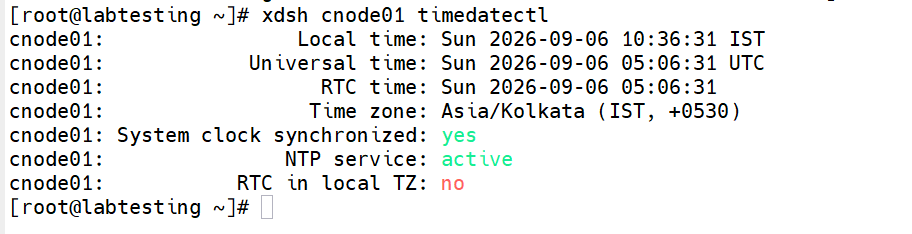
On the compute node, verify the system time synchronization state:
xdsh cnode01 timedatectl
Expected output:
cnode01: System clock synchronized: yes
cnode01: NTP service: active
cnode01: Time zone: Asia/Kolkata (IST, +0530)
The verification confirms that the system clock is synchronized and the NTP service is active.
5. Result
The configuration was successfully completed for compute node cnode01.
cnode01successfully synchronizes its clock with the xCAT management nodelabtesting(192.168.245.128) using chrony.chronyc sourcesoncnode01shows the management node as the selected (*) time source.chronyc clientson the management node showscnode01actively polling.timedatectloncnode01confirms:- System clock synchronized:
yes - NTP service:
active - Timezone:
Asia/Kolkata (IST, +0530)
6. Notes / Follow-ups
Apply the Configuration to Additional Nodes
The postscript uses xCAT's $MASTER variable, so it can automatically resolve the correct management node IP when applied to another node.
For a node range or group:
chdef <noderange> -p postscripts=setup_chrony_client
Then push the postscript:
updatenode <noderange> -P setup_chrony_client
Automatically Configure Newly Provisioned Nodes
For newly provisioned nodes, consider adding setup_chrony_client to the default postscript list of the relevant xCAT osimage.
This allows new compute nodes to automatically receive the chrony client configuration during provisioning.
7. Quick Command Reference
| Purpose | Command |
|---|---|
| Check NTP sources | chronyc sources |
| Check NTP clients | chronyc clients |
| Create postscript | vi /install/postscripts/setup_chrony_client |
| Make postscript executable | chmod +x /install/postscripts/setup_chrony_client |
| Assign postscript | chdef cnode01 -p postscripts=setup_chrony_client |
| Verify postscript assignment | lsdef cnode01 -i postscripts |
| Push postscript | updatenode cnode01 -P setup_chrony_client |
| Check node chrony source | xdsh cnode01 chronyc sources |
| Check node time status | xdsh cnode01 timedatectl |
8. Architecture
                 NTP / Time Source
                        |
                        v
              +---------------------+
              | xCAT Management Node |
              |     labtesting       |
              |   192.168.245.128    |
              |       chronyd        |
              +----------+----------+
                         |
                  xCAT / Network
                         |
                         v
              +---------------------+
              |   Compute Node       |
              |      cnode01         |
              |       chronyd        |
              +---------------------+
                         |
                         v
                 System Clock Sync
Flow:
xCAT Management Node → chronyd → cnode01 chronyd → synchronized system clock